


Spaces: Follow Businesses
4.26.77K Reviews
App Specs
- Version
- 2.131646.0
- Updated On
- License
- Free
- Downloads
- 10,000,000+
- Developer
- Wix.com, INC.
- Categories
- Productivity
- Platform
- Android, iOS
Screenshots




 Analysis by AppCompare
I first understood the appeal of Spaces: Follow Businesses when I imagined a household trying to keep track of several local services from one phone. One person wants to follow a favorite café, another needs to book an appointment, and someone else is interested in updates from a community. Instead of treating every business as a separate app or relying on scattered social feeds, Spaces brings those interactions into one place. That sounds simple, but the value depends on how clearly each person separates their own activity from everyone else’s.
This is a free productivity app from Wix.com, INC., designed for people who want to order online, book appointments, and keep up with businesses or communities. I would not describe it as a traditional task manager or a household organizer. Its strength is more specific: it gives you a central way to interact with participating businesses and spaces without constantly searching for them again. In my experience, it works best when you treat it as a personal directory of useful places rather than as a complete family coordination system.
Using Spaces on a shared household device
The shared-device scenario is where the app becomes more interesting than its short description suggests. Imagine a tablet in a kitchen or a phone that several people use occasionally. One person opens Spaces to check a business update, another uses it to arrange an appointment, and a third wants to browse a community. The app can support those moments, but I would be careful about assuming that one installation automatically creates clean boundaries between users.
My practical advice is to decide at the beginning whether Spaces will be a personal app or a shared household tool. If it is personal, keep your account activity on your own device and avoid casually handing the phone over while you are signed in. If it is shared, agree on who is allowed to make bookings, place orders, or follow new spaces. That small conversation matters because the app connects browsing with real actions, and a quick tap can carry more consequence than simply reading an update.
The app is particularly convenient for a household that repeatedly uses the same businesses. A parent might keep a salon, a restaurant, and a local community in one place, while another household member uses the same phone to look up a different service. The advantage is less about replacing every other app and more about reducing the number of separate places you need to remember. When a business supports the relevant interaction, the path from discovering it to using its service feels reasonably direct.
There is also a useful distinction between shared access and shared responsibility. Spaces may help several people see or interact with the same businesses, but it should not be confused with a chore board, shared calendar, or family inbox. I would still use a calendar for appointment times and a messaging app for confirming who is handling an order. Spaces is the place where the action happens; it is not necessarily the best place to document the agreement afterward.
Setting boundaries before anyone starts tapping
On a personal device, the initial setup is fairly easy to understand: install the app, identify the businesses or communities you care about, and explore what each one offers. On a shared device, the important setup is less technical and more behavioral. I would create a simple rule that each person checks whose account is active before making an appointment or order. That avoids the awkward situation where one household member assumes an action belongs to them while it was actually made through someone else’s session.
Worth Reading Before You Choose

EA SPORTS FC Mobile 26 Is a Bigger Football Game, but It Takes Time

Flipboard Shows What News Apps Must Do Beyond the Feed

Switching to Android Auto Means Rethinking Your Driving Routine

Google Calendar Makes a Crowded Week Easier to Manage

Ludo King Makes the Most of the Minutes Between Plans

Baby Panda World Brings Quick Play to Modern Phones, but Its Game Library Feels Busy
I also recommend separating “following” from “acting.” Following a business is a low-risk way to keep it available for later. Ordering or booking is different because it may involve personal details, timing, and a commitment. A useful household workflow is to let everyone browse, but ask the person making a booking to confirm the details aloud before submitting. This is not a built-in family feature; it is a sensible way to use the app responsibly when more than one person handles the same screen.
That boundary is especially useful with children or younger teenagers. The content rating is Everyone, which makes the app broadly approachable from an age perspective, but that should not be read as permission to let a child independently arrange services or place orders. Age suitability and decision-making responsibility are different things. I would allow a younger user to explore suitable communities with an adult nearby, while keeping purchases, bookings, and account changes under adult supervision.
Another setup tip is to avoid following every business that looks mildly interesting. Spaces becomes more useful when its collection reflects places you might genuinely use. A crowded stream can make important updates harder to notice, especially in a household where different people have different interests. I prefer a smaller, deliberate set of spaces and then adding new ones only when there is a clear reason to return to them.
The app has been available since August 28, 2016, and its current version is 2.131646.0. It requires Android 8.0 or later, so compatibility is worth checking before installing it on an older household phone or tablet. That requirement is not demanding by modern standards, but shared devices often stay in service longer than personal phones. If the family device is old, I would verify its Android version first rather than assuming every productivity app will install.
Coordinating orders, appointments, and community updates
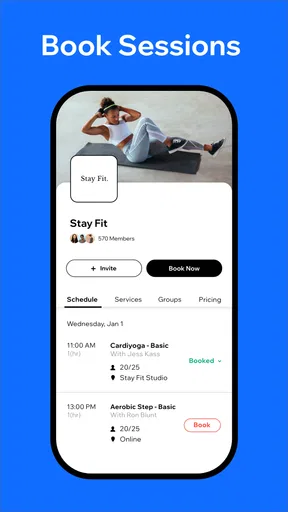
Where Spaces earns its place is in the short path between a business and the action you want to take. For an appointment, I find the most useful habit is to open the relevant space, review the available details carefully, and then record the agreed time somewhere everyone can see. The app may help you arrange the appointment, but a separate calendar remains better for reminders and household visibility. This two-step approach prevents the common mistake of assuming that the person who made the booking is the only person who needs to remember it.
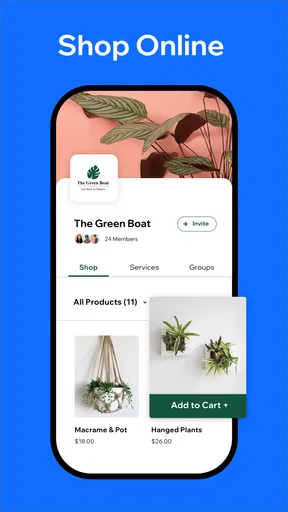
For online orders, I would use the app as the ordering doorway but keep expectations realistic. The experience can vary depending on how each business has built its space. Some may make the next step obvious, while others may present information that still requires you to contact the business or make a decision outside the app. I like the convenience of having the business in one familiar environment, but I would always review the final details before confirming anything, particularly when several people share a device.
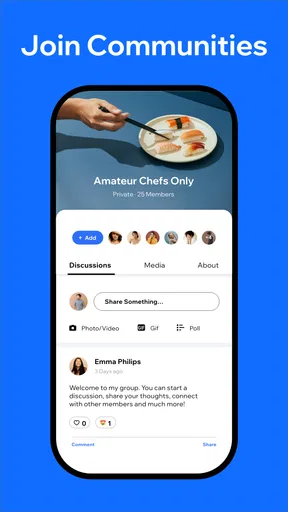
Community updates are a different kind of use. They are useful when you want to stay aware of announcements from a group, organization, or local business, but they can also become background noise. I would check these updates at a deliberate time instead of treating the app as a constant notification stream. For a household, that makes Spaces more manageable: one person can review relevant news and summarize anything that affects everyone, rather than expecting every family member to monitor every space.
A non-obvious strength is that the app can reduce repeated searching. If you already know which businesses matter to you, keeping them together saves the mental effort of remembering which website, social account, or standalone app belongs to each one. That is most noticeable for services you use irregularly, such as a clinic, repair provider, or event community. You may not need them every day, but when you do, having a familiar route back to them is helpful.
The trade-off is that Spaces cannot make an unresponsive or poorly organized business feel organized. The app can provide a common entry point, but the quality of the information and interaction still depends on the individual space. I would not install it expecting every business to offer the same depth of ordering, appointment, or community functionality. Its value grows with the businesses you actually use, not simply with the number of spaces you can discover.
For a family coordinating several people, I would use a simple sequence. First, the person who needs the service finds the correct business space. Second, they check the date, time, and details before confirming. Third, they place the appointment or order in a shared calendar or household note. Finally, they tell the person responsible for attending or collecting it. This workflow may sound ordinary, but it addresses the app’s main limitation in a shared setting: it connects you to the business more directly than it coordinates the people at home.
Trust, privacy habits, and age context
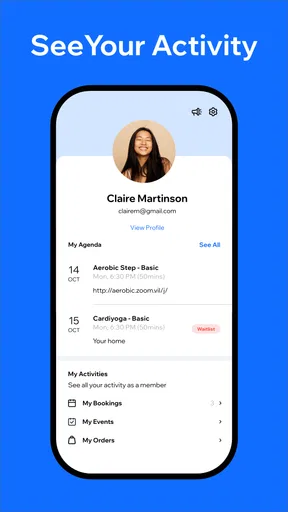
Because Spaces can be used for appointments, orders, and community participation, I treat account awareness as more important than I would with a simple news reader. On a personal phone, that means checking which profile is active before interacting. On a shared device, it means signing out or switching users when appropriate and not leaving personal activity open for the next person. I am not presenting this as a special Spaces control; it is a general account-safety habit that becomes more important when the app is used by several people.
I would also be selective about what a child is allowed to do independently. The Everyone rating is reassuring for general discoverability, but it does not answer practical questions such as whether a child understands appointment times, recognizes a misleading offer, or knows which information should not be entered into a form. An adult should guide the first few sessions and explain the difference between reading an update, following a business, and committing to an order or booking.
For older relatives, the app can be useful if they prefer one place for familiar businesses instead of remembering multiple websites. I would set it up with only the services they use and demonstrate one complete task, such as finding a business and reviewing its available options. The advantage is not that Spaces removes every step; it is that the starting point becomes easier to remember. If someone already has a reliable routine with a browser or a business’s own app, switching may not be worthwhile.
Trust also matters when several people follow the same community. One household member may interpret an update as urgent while another sees it as general information. I recommend checking the original context inside the relevant space before passing along a conclusion. Spaces can centralize updates, but centralization does not guarantee that every message is equally important or that every household member will interpret it the same way.
With around a 4.2 average from roughly 95 thousand ratings, the app has clearly attracted a substantial audience, and it has passed ten million installs. Those figures suggest that the concept works for many people, but they do not remove the need to judge it against your own routine. A popular app can still be unnecessary if the businesses you use already have excellent dedicated apps or if your household rarely orders online or books appointments through participating services.
How it compares with the usual alternatives
The closest alternative is often the mobile browser. A browser is more universal: you can search for almost any business, even when it has no dedicated presence in Spaces. It may also be better when you need broad research, compare several providers, or access a website that does not participate in the app’s ecosystem. I prefer Spaces when I already know the business and want a repeatable route back to it, but I would not abandon the browser for general discovery.
Dedicated business apps can offer a deeper experience for a single service. If you frequently use one restaurant, clinic, or retailer, its own app may provide more specialized account tools and a more focused interface. Spaces is more appealing when your needs are spread across different businesses and communities. It gives you a broader starting point, while a dedicated app may be better for intensive, repeated use with one provider.
Social media is another comparison point, especially for community updates. Social platforms are good at conversation and broad discovery, but they can mix important announcements with a large amount of unrelated content. Spaces feels more purposeful when you want to follow a particular business or community without turning the experience into general scrolling. On the other hand, people who rely heavily on social discussion may find a standalone space less lively or less complete than the network they already use.
For household coordination, a shared calendar and messaging app remain stronger tools. They show who is responsible, when something is happening, and what has already been agreed. Spaces complements those tools rather than replacing them. My preferred combination is to use Spaces for the business interaction and a calendar or message for the household handoff. That division of labor keeps each app doing what it is best at.
There is one more trade-off: simplicity versus control. Spaces can make repeated access feel less fragmented, but a household that needs detailed permissions, approval steps, or separate activity histories may want a more specialized family-management solution. I would skip Spaces as the central household platform if your main goal is controlling screen time, assigning chores, or managing multiple personal accounts. Those are different problems from following businesses and arranging services.
Who will get the most from Spaces?
I think the app is a good fit for adults who regularly interact with local businesses and want a single, familiar place to find them again. It also suits households where several people use the same services but need a simple routine for deciding who books, who orders, and who keeps the appointment visible. The free price makes trying it low-risk, and the Everyone age rating means it can be introduced in a mixed-age home with sensible supervision.
It is less convincing for someone who only wants a basic calendar, notes app, or reminder list. Spaces is not the tool I would choose to track chores, plan a family trip, or maintain a detailed schedule. It is also not my first choice for someone who already has every important business saved in a browser folder and rarely needs community updates. Installing another app only helps when it removes a real point of friction.
I would also think twice if your home has strict separation between personal accounts. A shared phone can be convenient, but it increases the chance of using the wrong active session or leaving private activity visible. In that situation, separate devices or clearly separated accounts are preferable. The app can support shared discovery, but it does not turn a shared device into a fully separated multi-user environment.
Finally, I would skip it if the businesses you care about do not provide useful interactions through their spaces. The concept depends on practical participation. If you open the app and find little more than information that you could have found faster elsewhere, it will not earn a permanent place on your home screen. The best test is not how many spaces you can follow, but whether the few you need make ordering, booking, or staying informed easier.
My household verdict
After looking at it as both a personal productivity tool and a shared-household doorway, I see Spaces as a focused convenience rather than an all-purpose organizer. I like the idea of keeping familiar businesses and communities close at hand, especially when I need to return to them after a long gap. The app is most useful when I pair it with a calendar or message for the people at home, because the business interaction and the household coordination are separate jobs.
My strongest recommendation is to start small. Add only the businesses or communities that someone in the household genuinely uses, decide who may place orders or bookings, and teach younger users to ask before submitting anything. That approach keeps the app understandable and avoids turning it into another noisy feed. It also makes its real benefit easier to judge: whether it saves time during the next appointment, order, or community update.
Spaces is worth trying if you want a shared starting point for business interactions, not if you need a complete family-control or scheduling system. Its free availability, broad age rating, and established presence make experimentation easy, while its limitations are clear once you separate following from acting and business access from household responsibility. For the right home, it can make scattered local services feel more reachable. For a home that already has dependable browser bookmarks, dedicated apps, and a strong coordination routine, it may remain optional rather than essential.
Pros
- Follow local businesses and receive updates in one dedicated feed.
- Discover nearby shops
- restaurants
- and services more easily.
- Useful for finding promotions
- events
- and new business announcements.
- Helps support independent businesses by keeping them visible.
- Simple way to stay connected without checking every business website.
Cons
- Content quality depends on how actively businesses update their profiles.
- The app may be less useful in areas with limited business coverage.
- Frequent promotional posts can make the feed feel cluttered.
- Some features may require creating an account or sharing location data.
- Businesses may not respond quickly to questions or customer feedback.
FAQs for Spaces: Follow Businesses
What is Spaces: Follow Businesses, and how does it work?
Spaces: Follow Businesses is an app designed to help you discover and keep up with local businesses, brands, venues, and services in one place. After creating an account, you can search for businesses or browse recommendations, follow the ones you like, and view updates such as announcements, promotions, events, and other shared content. It is useful for users who want business information without relying entirely on traditional social media feeds.
Do I need an account to use Spaces: Follow Businesses?
An account is generally required to access the app’s main interactive features, including following businesses, saving content, receiving updates, and managing your personal preferences. Some information may be visible before signing in, depending on the available version and region, but creating an account provides a more complete experience. Before registering, review the requested permissions and privacy policy so you understand how your information will be handled.
Can I find businesses near my location in Spaces?
Yes, the app is intended to help users discover businesses and follow relevant local organizations or services. Location-based discovery may depend on your device settings, the businesses available in your area, and whether you grant location permission. You can usually search manually if you prefer not to share your precise location. Results may vary considerably between cities, especially where fewer businesses actively use the platform.
What kind of updates or content can businesses publish?
Businesses can use Spaces to share information that may help customers stay informed, including news, special offers, events, product announcements, opening-hour changes, and other updates. The exact content depends on how each business manages its profile. Following a business does not necessarily guarantee frequent posts, immediate notifications, or exclusive discounts, so users should treat the app as an additional information channel rather than a replacement for direct contact.
Is Spaces: Follow Businesses free to download and use?
The app may be available to download at no cost, but availability, features, and possible charges can differ between Android and iOS, as well as by country. Some businesses may promote paid products or services through their profiles, while optional features could potentially require payment if introduced by the developer. Check the official store listing for the current pricing, subscriptions, in-app purchases, supported devices, and any restrictions before downloading.


